


Easy-to-use time tracking and billing for professional services
Track client work as you go, then turn your hours into invoices in the accounting software you already use.


Less time on timesheets. More time for client work.
From a quick call to a month of client work, MinuteDock makes time easier to track and bill.
Track time as you work
Start the timer and type what you’re working on. Keep billable hours organised by client and project.
Keep budgets on track
See how much of a project budget or retainer you’ve used.
Time tracking that fits the way you work.
Keep client hours in view, whether you’re an accountant tracking billable time, a bookkeeper on fixed fees or a consultant managing retainers.
Time tracking for small businesses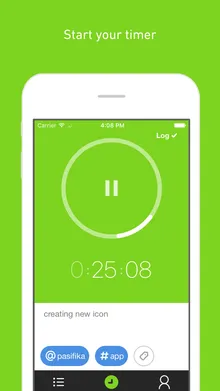
Track time from your phone
Log work after a meeting or site visit. Your time syncs with the web app.



Log time with your AI assistant
Connect Claude, ChatGPT or Grok to log time and ask for reports in plain English.
Turn tracked time into invoices in your accounting software.
Turn your logged hours into invoices through MinuteDock’s Xero integration, QuickBooks, MYOB or Wave. Keep your existing invoice branding and payment process.
A few common questions
- How do I track time across different clients and projects?
Assign time to a client and project as you log it. Review each client’s hours and see which projects take the most time. See how time tracking works.
- Can I separate billable and non-billable hours?
Track internal admin alongside client work, then separate billable and non-billable hours in reports. See where your time goes, including work you won’t invoice. Explore reporting.
- Can I track fixed-fee work as well as hourly work?
Yes. Track time against fixed-fee projects and retainers alongside hourly and non-billable work. Compare the hours with your fee to see which work pays.
- What if I forget to start the timer?
Add the time afterwards, on the day you did the work. You can correct entries and resume previous tasks too.
- Can I invoice tracked hours through my accounting software?
Yes. Create invoices from your tracked hours and send them to Xero, QuickBooks, MYOB or Wave as drafts. Review and send them to your clients from your accounting software. See how billing works.
- Does it work for a whole team?
Each person tracks their own time. Review your team’s hours by client, project or person, with billing rates to suit the work. Explore time tracking for teams.
- Can I use an AI assistant to log time and get reports?
Connect Claude, ChatGPT or Grok to MinuteDock. Describe the work to log time, or ask for hours by client, project or person in plain English. Explore AI assistants.
- What’s included in each plan?
Every plan includes every feature. Plans differ only in how many people they include. Compare plans.
Businesses all over the world love MinuteDock
5 out of 5 stars
MinuteDock is simple, quick and easy to use. I'm not that computer-savy and it's a breeze to use.
5 out of 5 stars
I love that MinuteDock and Xero integrates so well. Makes my job so much easier.
5 out of 5 stars
I love the ease with which you can create an invoice with all the time-sheeting information clients want.
5 out of 5 stars
I'm so SO thankful for this software, and specifically how it talks to Xero - it's made this part of my business so efficient.
5 out of 5 stars
An incredibly efficient and easy to use timekeeper! Perfect for keeping track of schedules.
5 out of 5 stars
Great tool, super responsive and lovely team. Makes invoicing a breeze.
5 out of 5 stars
MinuteDock saves me a ton of time and I know my time is being tracked accurately.
5 out of 5 stars
I absolutely LOVE MinuteDock! Time tracking and invoicing was a chore until I starting using this about 6 months ago.
5 out of 5 stars
Absolutely love using MinuteDock and it's intergration with Xero - this app saves me so much time each month.
Track your time with ease. Bill with confidence.
Try MinuteDock free for 14 days. Pricing starts from $19 per month, and you can cancel at any time.