
An invoice marked “sent” doesn’t tell you whether payment is on track or a conversation has stalled. And the unpaid-invoice list won’t show last week’s work if you haven’t billed it yet.
Keeping track of invoices and payments is easier with two connected views: work awaiting billing, and invoices awaiting payment. Together, they show what you can bill, what remains outstanding and which clients need a follow-up.
Free invoice tracker for Excel and Google Sheets
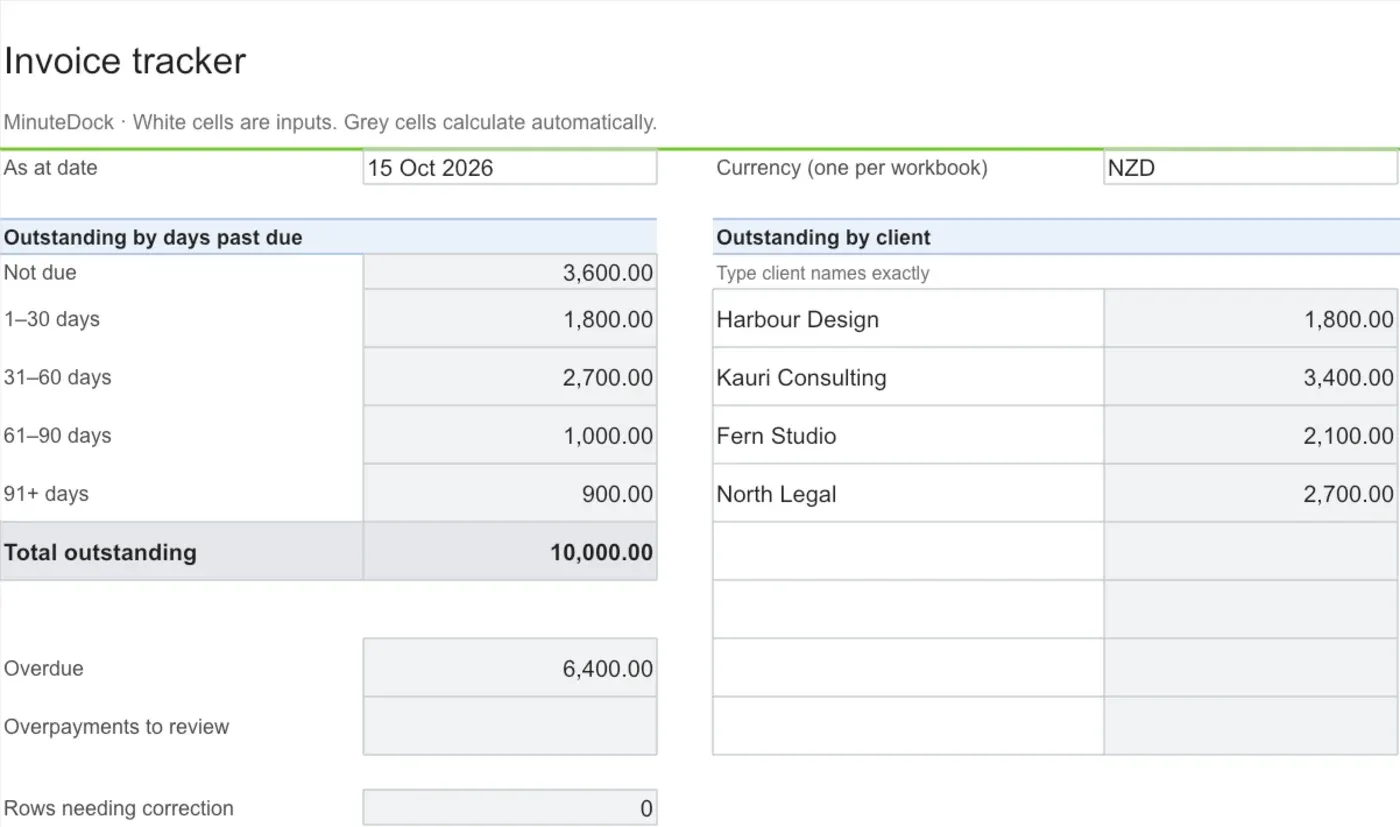
Keep invoice balances and follow-ups in one place
Balances and overdue totals update as you add invoices, payments and credit notes. Includes space for 300 invoices and 900 payment allocations.
Download invoice trackerExcel (.xlsx)
If you already manage invoices in accounting software, its receivables list may give you the view you need. The spreadsheet is useful for a manual invoice list or a shared follow-up record, with space for the next action alongside each balance.
What’s ready to bill?
A regular billing review helps catch work that could otherwise sit outside the invoice cycle. For an accounting practice, that might be additional advisory work completed alongside a monthly engagement. The recurring fee goes out as usual, while the extra work is still waiting to be billed.
A view of unbilled work by client, service period and expected billing date makes those gaps easier to spot. That applies whether the amount comes from tracked hours, a fixed fee or an agreed milestone. The billable timesheet template includes an uninvoiced amount by client for work billed by the hour.
In MinuteDock, you can review uninvoiced billable time, apply your rates and turn it into invoices without retyping the timesheet. That gives your billing review a starting point.
An invoice record you can pick up later
Once an invoice goes out, the useful question is what you’ll need when you come back to it. The amount and due date tell you what’s outstanding; the conversation history tells you what’s happening with it.
You can add the invoice details to the tracker alongside payments, the last contact and any agreed next step. Keeping those together means a colleague can pick up a follow-up without reconstructing the email trail.
| Information | What it adds to the review |
|---|---|
| Invoice number, client and engagement | A reference back to the bill and the work behind it. |
| Due date and remaining balance | The amount still to collect and how long it has been outstanding. |
| Last contact and any payment commitment | Context for deciding whether another reminder would help. |
| Next action, date and owner | A clear handover when more than one person handles billing. |
A note about a disputed charge or promised payment date is often more useful than another status label. It explains why the invoice is still open and what would move it forward.
Keeping balances current as payments arrive
Partial payments and receipts covering several invoices can make a simple paid/unpaid label unhelpful. Linking each receipt to the invoices it covers gives you a remaining balance to work from. In the tracker, you can split a combined receipt across those invoices using the same bank reference, so the allocations remain easy to trace.
Credit notes appear separately from payments. This preserves the distinction between an adjusted charge and money collected, while both reduce the amount outstanding. Overpayments also appear separately, so they don’t offset another client’s unpaid balance in the summary.
The dates matter when you’re looking back at a month-end position. The tracker’s As at date lets you see balances at that point without including invoices or payments from later in the month. A dated payment history makes that possible without maintaining separate month-end copies.
Before a follow-up, a comparison with your bank and accounting records can catch a receipt that hasn’t been allocated or a credit that hasn’t reached the tracker. It avoids chasing a balance that has already changed.
Which invoices need attention first?
An ageing summary groups unpaid balances by days past due, giving you a starting point for the week’s follow-ups. Age and amount help set priorities, but the last conversation with the client determines the next step.
Three invoices from the tracker at 15 October 2026 show the distinction:
| Invoice | Remaining balance | Position | Possible next step |
|---|---|---|---|
| INV-102 | 2,400 | Due today | Confirm payment arrangements if a check-in is warranted. |
| INV-103 | 1,200 | Part-paid; 15 days overdue | Ask when the remaining balance is expected. |
| INV-107 | 900 | 97 days overdue | Revisit what’s preventing payment and who can resolve it. |
The largest balance isn’t necessarily the most urgent conversation. A recent part-payment gives you a different starting point from an older invoice with no agreed resolution. The ageing figures help you find those cases; the follow-up notes help you act on them.
Reports can age invoices from different dates. Xero’s aged receivables report supports due-date or invoice-date ageing; the tracker uses due dates. Matching that basis makes comparisons with your accounting report more useful.
Turning the review into a useful follow-up
A weekly review can keep overdue invoices moving without someone checking the whole list every day. A shared next-action date also helps colleagues avoid sending duplicate reminders or reopening the same unanswered question.
The timing depends on your agreement and the client’s response. A routine might look like this:
| Situation | A useful response |
|---|---|
| A large invoice is approaching its due date | A check-in to confirm it has reached the person approving payment. |
| An invoice is overdue and there’s no payment commitment | A reminder showing the outstanding balance. |
| A reminder hasn’t had a response | A direct conversation about what’s holding payment up. |
| An agreed payment date has passed | A follow-up on that commitment, with a new action recorded. |
A short note such as “Client querying cleanup hours; Sam to send time breakdown on Friday” gives the next person enough context to continue. For a disputed charge, that may mean explaining the work behind the charge before another payment reminder will achieve anything.
MinuteDock keeps the work behind those charges connected to your billing. With Xero timesheets, tracked work becomes invoices in Xero; MinuteDock also integrates with QuickBooks Online, MYOB, FreshBooks and Wave. The detail is there when you need to explain a charge, as well as when you’re preparing the bill.
The weekly review then covers both sides: work ready to invoice and invoices needing attention. A tidy receivables list is much more useful when it doesn’t conceal work you haven’t charged for yet.