Clockify alternative
A Clockify alternative that makes invoicing easier
Track client hours easily, see what’s unbilled, and create invoices through Xero, QuickBooks, or your existing accounting software.
- 14-day free trial (no credit card required)
- We'll help you set up clients and rates. Email team@minutedock.com
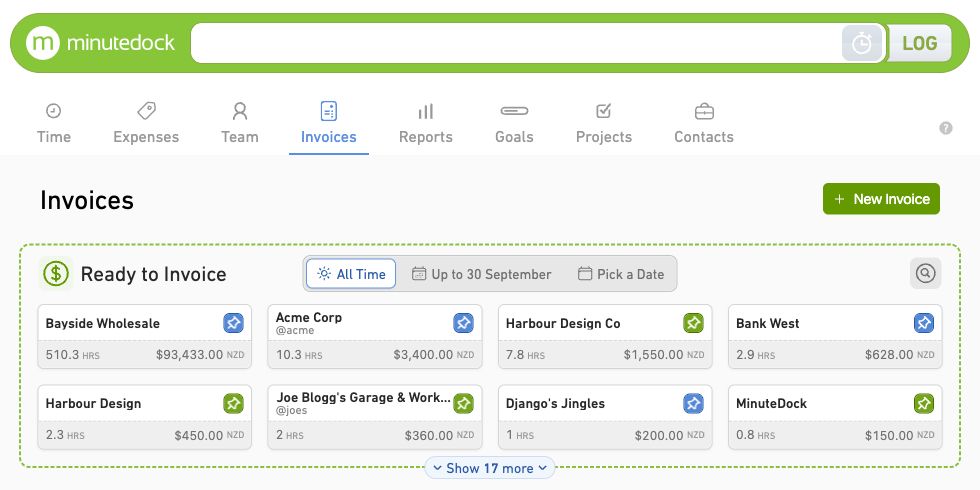
- Clients
- Time by client
- WIP
- Unbilled work
- Invoices
- From your hours
Create invoices from tracked time in the accounting tools you already know.
MinuteDock vs Clockify: from hours to invoices
Both tools track time and create invoices. For accountants, consultants, and agencies, the difference is how invoicing connects with your books.
Time tracking
MinuteDock: Timer or manual entries, with client, project, rate, and notes.
Clockify: Timer or timesheet. Entries organised by project and task.
Invoicing
MinuteDock: Turn unbilled hours into invoices. Edit and group lines, then send to accounting software.
Clockify: Invoices from time and expenses. Standard plans and up.
Accounting software
MinuteDock: Xero, QuickBooks Online, MYOB, FreshBooks, and Wave.
Clockify: Xero invoices via paid add-on. Time entries sent to QuickBooks for billing.
Plans
MinuteDock: Every feature on every plan, including budgets, reporting and accounting integrations. Unlimited clients, projects, invoices and time tracking.
Clockify: Free tracking for up to five users. Paid tiers charge per active or invited user; features vary.
Sources: Clockify pricing and plan features and MinuteDock plans. Pricing and integration workflows checked 5 October 2026.
Accounting and billing support
| Feature | MinuteDock | Clockify |
|---|---|---|
| Xero | Yes | Yes: US$4.99/month add-on; Standard and up |
| MYOB | Yes | No |
| QuickBooks Online | Yes | Yes, with conditions: Sends time, not invoices |
| Wave | Yes | No |
| Sends invoices to accounting | Yes: Drafts in all five accounting connections | Yes, with conditions: Xero only, Standard and up |
| Codes lines to your ledger accounts | Yes: By Contact, Project or Task | No |
| Tracking categories / classes | Yes: Xero and QuickBooks Online | No |
| Client list comes from accounting software | Yes: Syncs automatically | No: Kept in Clockify |
Explore plans and accounting connections
A quick client call belongs on the invoice
Type the client, work and time in one line. Start a timer or resume a previous task with a click, so switching between jobs doesn't mean rebuilding the same entry.

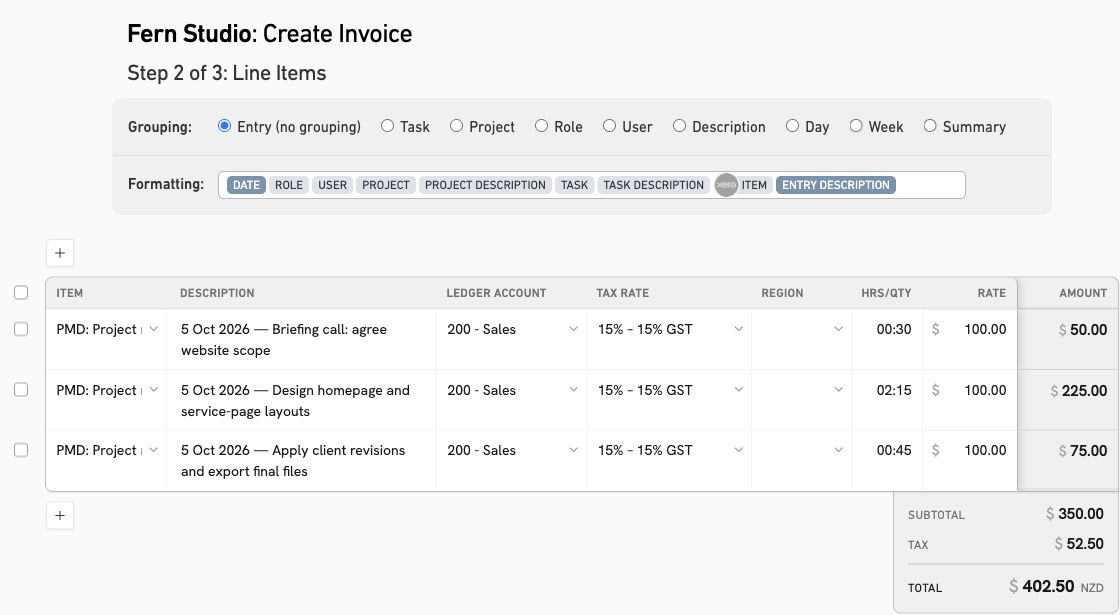
Those hours can be your next invoice
Group a month’s calls together or give a client an itemised breakdown. MinuteDock remembers their invoice layout for next time and sends the draft to your accounting software, with hours and rates already filled in. Billed time is marked, so you can see what’s left to invoice.
Make the hours count, however you charge
- Accountants and bookkeepers
- Check monthly fixed-fee packages against actual hours and bill extra advisory work.For accountants · For bookkeepers
- Consultants and agencies
- Track hours against retainers and project budgets. Discuss extra work before it eats into the fee.For consultants
- Legal professionals
- Track calls, research, and drafting by matter, then invoice the unbilled hours.For lawyers
- Virtual assistants
- Track small client jobs and the hours each recurring package uses.For virtual assistants
Try MinuteDock on a real project
Try a live project for 14 days: track time, check the budget, and create an invoice in your accounting software before moving your history.
We’ll help you make the move
Tell us how you bill and what you’d like to bring from Clockify. We’ll help with setup, rates, and your exported records. Try a project first, then plan the move.
- 1
Try your usual client work
Track real work and create an invoice for one client during your trial.
- 2
Set it up with our help
We’ll set up clients, projects, tasks, and rates with you to match how you charge.
- 3
Bring over what you need
Happy with the trial? We’ll review your Clockify exports and help map the records you need.
Clockify alternative FAQs
- Can different people charge different rates?
- Yes. Set rates by person, client, project or task. Your team can track work for the same client at different charge-out rates, with those rates used when you build the invoice.
- Does MinuteDock have a free plan like Clockify?
- MinuteDock has a 14-day trial; Clockify is free for up to five users. All MinuteDock plans include unlimited clients, projects, invoices, and time tracking. Try tracking and invoicing for a real client.
- What should I include in a price comparison?
- Every MinuteDock plan includes every feature and accounting integration; choose by team size. Clockify charges per active or invited user on paid plans, plus a separate Xero add-on. See MinuteDock’s plans for your team size. If you’re also considering Harvest, use the Harvest price calculator to compare costs for your team and workload.
- Will invoices work with my existing accounting setup?
- Connect Xero, QuickBooks Online, MYOB, FreshBooks, or Wave. In Xero and QuickBooks, you get draft invoices from tracked time with ledger accounts and tracking categories or classes, ready to approve and send.
- Can you help bring my Clockify records across?
- We’ll help plan the move and map exported clients, projects, tasks, rates, users, and time entries. Talk to us about your records and we’ll work through the move with you.
- Can I track retainers and fixed-fee packages?
- Yes. Compare actual hours with a budget: check whether a bookkeeping package needs repricing, or how much of a consulting retainer is used before agreeing more work.
Give your next client invoice a head start
Track one client’s hours, review unbilled work, and build an invoice. Try it free for 14 days, no credit card required.